
A Week With the Framemeister
Note: high resolution versions of all images presented here are available at http://imgur.com/a/Chl9T
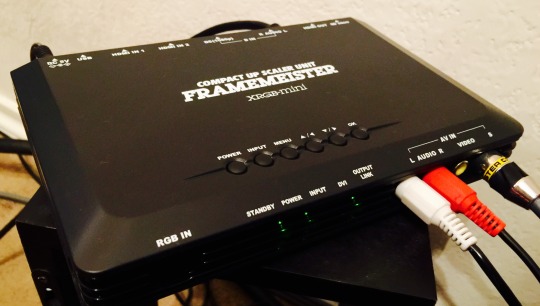
A week ago my good friend and co-host, Chris Saturn, graciously allowed me to borrow his XRGB Mini Framemesiter, a device which I’ve coveted for a couple of years now. He purchased his from a Japanese seller on eBay, and, despite using multiple televisions and cables, was unable to coax it into working with his setup. Long story short: he was refunded the money he spent on the device (believing it was faulty at the time) and was allowed to keep it as well. And there it sat for the last few months, until he brought it over for me to play around with.
Much to my surprise (and perhaps Saturn’s chagrin), the device worked flawlessly on my 2007 Vizio LCD TV. Granted he had performed most of the routine maintenance, including setting the device to English, applying an English remote overlay, and tweaking the settings to best take advantage of our input of choice, S-Video. Now, it should be noted that the Framemeister is lauded as the absolute best way to upscale RGB signals from capable systems to a modern television. But, neither of us have the required cables for our systems that support RGB nor the required mods to output RGB from our systems that do not. So, keep in mind that all of my tests were done using S-Video and (when absolutely forced to) composite inputs. Retro gaming purists may scoff at this, but I think testing the Framemeister with S-Video and composite is a worthy endeavor for two reasons: S-Video and composite are the cheapest methods to hooking up retro systems, and there’s very little information online about how well the Framemeister handles S-Video. I wanted to know for myself if it was worth the price tag if I wasn’t also willing to invest in RGB for my entire setup.
Before digging into my game and system specific tests, it should be noted that there was some calibrating I had to do on my television to get the Framemeister looking acceptable. In addition to switching to the normal “game” mode on my Vizio and turning off all image processing features, I had to widen my vertical axis. At the very top of the image output from the Framemeister there was a thin green line, which would occasionally disappear only to show back up again later on. In any horizontally scrolling games it was easy to ignore, but while playing anything that scrolled vertically it became a major distraction. Luckily, my television allowed me to simply crop it out of the image, but I never discovered the cause of the green line. Additionally, I was unable to get the Framemeister to work with 1080p output on any of the systems I tested. This could’ve been a fault with my individual unit, but I never investigated much further after 720p seemed to work normally.
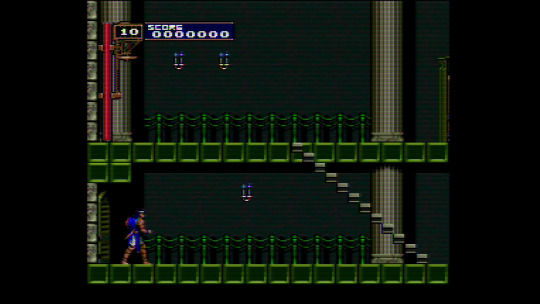
The first system I tested was my trusty PC Engine, modded to output S-Video. Until this test I had been using the system exclusively on my 36” Sony Trinitron CRT, which is a fantastic television despite being plagued by some geometry issues (a common problem with flat-front Trinitrons). Immediately the image was noticeably cleaner than when playing directly on the Vizio, and the input lag was negligible to the point that I didn’t even notice it. The game I tested the setup with was Rondo of Blood, and my point of focus was the life bar. Having clearly defined edges and bright red colors make this the easiest way to judge how well the image is being displayed. When connected directly to the Vizio, Richter’s life bar has clear artifacts around the edges and the color bleeds out, but with the Framemeister the red rectangle was clearly defined and properly colored. Needless to say I was impressed. No, this wasn’t an RGB signal, but the Framemeister still handled it admirably. This was also the first time I got to see the scanlines of the Framemeister in action, and they not only looked great but they appeared to line up appropriately on the sprites themselves. This created a much more authentic look than, say, the scanlines on the Retron 5.
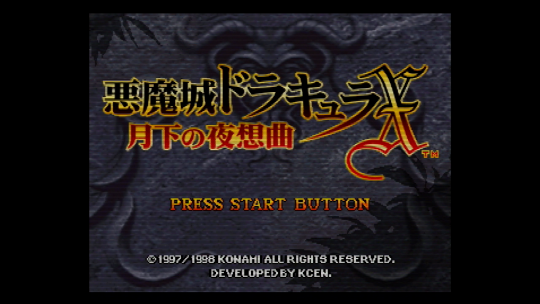
Next up was my Sega Saturn, also over S-Video. Keeping with a Castlevania theme, I first tested out Dracula X. Again, the image was incredibly clean despite coming in over S-Video, and even the title screen looked stunningly sharp and accurate. However, upon loading the game I ran into one of the biggest issues with the Framemeister: the device drops connection when a game changes resolutions. Whenever I paused Dracula X, which is when the resolution change occurs, the Framemeister would drop connection causing my TV to also drop connection while both devices adjusted to the change. This meant when entering or exiting the pause menu I was subjected to a wait of several seconds. While this is nothing more than a minor annoyance when pausing the game, unpausing the game means leaving yourself open to attack while you wait for the Framemeister device to calibrate. In a game like Dracula X, these few unprotected seconds can often lead to death. Next up I tried out Radiant Silvergun, which seemed to have some minor issues dropping signal during the intro but otherwise played normally and looked fantastic. Having had these issues with two games in a row, I do wonder if it’s more of an issue with how the Saturn outputs video than resolution changes, but I have no way to test that theory.
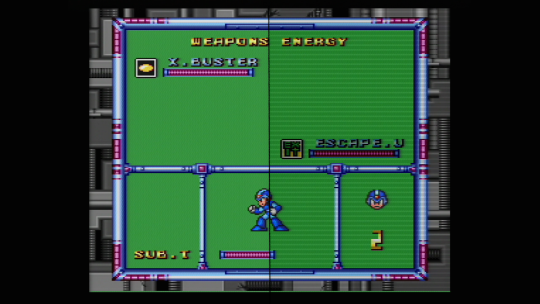
My Super Nintendo preformed less admirably over S-Video than previous systems. At first glance the image looked just as good as the Saturn, and I specifically chose to start with Super Mario World to test for any input lag. I’m happy to report that, despite trying desperately, I haven’t found any noticeable lag. Unfortunately I experienced both audio and visual noise. The audio noise was only noticeable when there was absolutely no sound being produced (such as when Super Mario World is paused), but the visual noise was very apparent on any screen with large amounts of a single color. I swapped cartridges to Mega Man X to get a closer look at the visual noise using the game’s pause menu. The noise manifested itself in the form of slightly jagged, mostly transparent vertical lines. When scanlines were turned on they combined with the visual noise to create a screen door effect, which looked strange indeed. In this case I’m relatively positive that the noise was being introduced by my Super Nintendo, since S-Video worked great on both previous consoles I tested. So, this issue may not be the Framemeister’s fault, since it’s only as good as the signal it’s given, but this was a lesson I learned all too well with the next system.
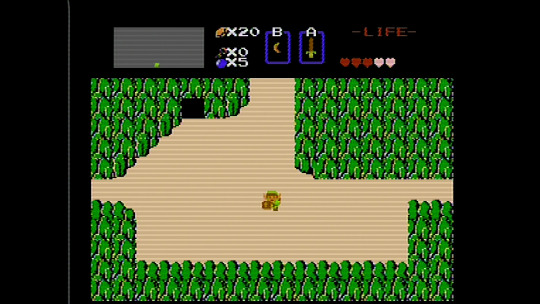
I honestly didn’t have very high hopes for the image quality of my NES through the Framemeister. I’ve never made the investment to mod the system for S-Video or RGB, so I was using standard composite cables. The first (and last) game I tested on it was The Legend of Zelda, and immediately the finer lines in the menu and status bar were awful looking. I played around with the sharpness settings on the Framemeister, but I was stuck alternating between fuzzy lines or white artifacts.
This brings up a critical point when considering whether or not to purchase a Framemeister, despite not having all RGB-capable systems: for anything less than RGB a standard CRT will hide flaws while the Framemeister will enhance them. My NES looks great on my CRT, despite being composite, simply because the imperfect nature of a CRT image hides the tiny (and sometimes not so tiny) flaws of the composite image. While I’ll admit that it’s a little bit silly to harp on frugality when discussing a device that’s over $300, it has become clear that the Framemeister isn’t worth the investment unless you’re also ready to invest in RGB mods and cables. And even then you’ll still battle with resolution changes and constant settings tweaks. All that said, the device does an incredible job when setup properly with proper inputs using the proper games, it’s just not the instant cure-all I was hoping for. Overall, I can’t say that I’m not impressed with it, and when it does work properly it produces a fantastic image. But, at the same time, high end CRTs are still readily available for cheap in most areas or for free on most garbage days. It’s really difficult to recommend the Framemeister unless you just absolutely do not have the space for a dedicated retro gaming television. But, if you’re stuck with limited space, you’re ready to explore RGB, and insist on using a modern television, then it seems like it can really work wonders.